


What is Desktop Adapter
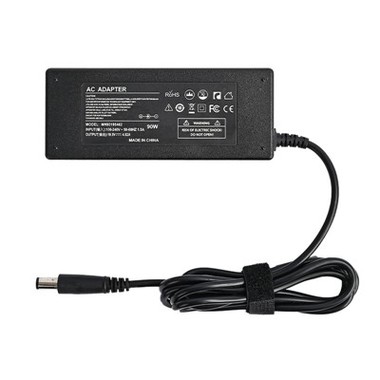
Desktop adapters can sometimes be called chargers, AC power adapters, or AC adapters. All of these names are correct, except for charger. A charger serves a different function than a power adapter does. The desktop adapter serves the purpose of converting AC voltage to a single DC voltage for your computer. It operates as an external battery for your computer so that the computer's size does not need to be so large. A computer uses many different DC voltages. One is provided by the desktopadapter and the other is provided by internal circuits in the computer itself. These combined give the computer what it needs. The power adapter serves as the battery that is providing specific energy and volts to a specific computer it is plugged into.
Advantages of Desktop Adapter
Convenience: With a desktop adapter, you can charge your device from anywhere with an outlet. This makes it easy to keep your device charged and ready to use when you need it, whether you’re at home, at the office, or on the go.
Faster charging: Desktop adapter are designed to charge devices quickly and efficiently. This means you can spend less time waiting for your device to charge and more time using it.
Safety: A good quality desktop adapter will have safety features like over-voltage and over-current protection, which will protect your device from damage caused by power surges or voltage spikes.
Energy efficiency: Many desktop adapter are designed to be energy efficient, which means they use less energy to charge your device, and this saves you money on your electricity bill.
Durability: An desktop adapter is a durable accessory that can last for years with proper care. This means you won’t have to worry about replacing it as often as you would with a battery, which can be expensive.
Portability: Desktop adapter are lightweight and small, making it easy to carry them with you wherever you go.
Compatibility: An desktop adapter can be used with multiple devices, as long as it is compatible with the device and has the correct connector. This can save you money and minimize the number of chargers you need.




Why Choose Us
Applications
Our products have a wide range of applications, serving as power sources for bank smartphones, communication equipment, monitoring and security systems, LED lights and screens, mobile electronic devices, home appliances, and outdoor emergency power supplies. Our products are indispensable in various aspects of daily life.
Competitive Price
By selling directly from the factory, we offer competitively priced products, eliminating the need for multiple intermediaries and ensuring cost-effectiveness. We also welcome both new and existing customers to visit our factory for guidance and inspection.
High Quality
Quality is our utmost priority. Our factory is ISO9001 and ISO14001 certified, maintaining strict control over the production process and conducting thorough testing of all materials. Our products undergo comprehensive global certification for circuit design, ensuring stability, efficiency, and energy conservation.
24H Online Service
We provide worry-free after-sales service, available 24/7 to address any inquiries or concerns. In cases of damage due to human factors, we offer free replacements.
Custom Service
Customization is available to meet specific requirements. With a professional R&D team, we can customize power supplies and chargers in terms of color, appearance, plug types, cable lengths, branding, and packaging. Circuit boards can also be redesigned according to customer specifications.
Global Shipping
With robust production capacity and efficient logistics, we guarantee short delivery times. Our factory has an annual output of up to 8 million units, ensuring ample stock availability. Our experienced sales team directly communicates with clients, streamlining the process and eliminating misunderstandings or delays caused by intermediaries, thus saving you time, effort, and worries.
Working Principle of Desktop Adapter
The working principle of desktop adapters is mainly based on switch mode power supply technology. A switching power supply is a type of power supply that maintains a stable output voltage by controlling the time ratio of switching on and off. The switching power supply of the power adapter is generally composed of a pulse width modulation (PWM) control IC and MOSFET.
1). Input filtering: The desktop adapter first receives AC power from the grid. At the input end, high-frequency noise and clutter in the power grid are filtered out through a filtering circuit to ensure the stability of the input power supply.
2). Rectification: The filtered alternating current enters the rectification circuit, which converts the alternating current into direct current. The rectifier circuit generally adopts a bridge rectifier method, which has high rectification efficiency and stability.
3). Filtering: The rectified direct current is further filtered out by the filtering circuit to make the output voltage more stable. The filtering circuit generally adopts the capacitor filtering method, which filters out the ripple through the charging and discharging effect of the capacitor.
4). PWM control: The filtered DC current enters the PWM control circuit. The PWM control circuit controls the output voltage by adjusting the on and off time ratio of the switching tube. When the output voltage increases, the PWM control circuit reduces the turn-on time of the switching transistor and lowers the output voltage; When the output voltage decreases, the PWM control circuit increases the turn-on time of the switching transistor and increases the output voltage. Through this method, the PWM control circuit can achieve precise control of the output voltage.
5). Output filtering: The output voltage adjusted by the PWM control circuit is further filtered by the output filtering circuit to reduce ripple and noise, and improve the purity and stability of the output voltage.
6). Load detection and protection: The desktop adapter also has load detection and protection functions. When the load current is too high or the load is short circuited, the desktop adapter will automatically cut off the output circuit to protect internal components and equipment from damage. In addition, the desktop adapter also has protection functions such as over-voltage, over-current, and overheating to ensure the safe operation of the equipment.
How to Choose Desktop Adapter
Ac input voltage
Most power adapters available today can accept a “universal” 90 to 264 vac input voltage, which can support the vast majority of worldwide applications. Portable medical applications may require an ac input voltage as low as 85 vac, and lighting applications often use a 277-205 vac source. Note that some industrial and many infrastructure applications use a much higher ac voltage range, which would require different types of power converters.
Dc output voltage
A product or device that is powered by an power adapter requires a particular voltage, usually in a range from as low as 3.3 vdc to as high as 56 vdc, to operate correctly. An adapter must be selected with the appropriate matching dc output voltage, which will be marked on its label. Most adapters provide a single dc output, but some adapters provide two or three different output voltages (each with its power rating.)
Power rating
One of the most important power adapter specifications that is often overlooked is its output power rating. An adapter's power rating is marked on its label, typically specified in watts (w). This rating depicts the maximum power that can be reliably delivered from the adapter to the product being powered. The power rating of the adapter must always be equal to or greater than the power that will be consumed by the product being powered. Otherwise, undesirable results, such as reduced adapter lifetime, limited performance, or complete loss of functionality could occur.
It is important to note that an adapter's power rating is generally defined for use at room temperature. Operation at temperatures well above that - typically above 40-50 deg c (105 to 120 deg f) – may not support the full power rating. The datasheet for the adapter should include a power derate over-temperature graph, which details the maximum power that can be delivered at given operating temperatures.
Connectors
Connectors that are appropriate for each application will need to be selected for both the ac input and the dc output of the adapter power supply. For the ac input, a common practice for desktop adapters is to use an iec320-c14 or -c8 inlet, to which standard power cords with wall socket plug ends suitable for use in specific countries can be separately attached.
A great diversity of dc power connectors are required by the innumerable applications that can use power adapters. System designers tend to make their own decisions on what connector they prefer, and it is usually straightforward to accommodate almost most requests. The most common standard dc connectors are female barrel plugs, which are two-conductor (output voltage and return) solutions that are also available in a variety of sizes.
The four main parameters that need to be specified for a barrel plug are inner diameter, outer diameter, barrel length, and polarity - whether the center contact is the output voltage (standard configuration) or the return. Other barrel plug features include whether there is a “locking” mechanism, such as a screw-on collet, to secure the plug to the jack on the device being powered.
Safety certifications
Finally, power adapters will require safety certifications specific to the applications and countries in which they will be used.
It is strictly forbidden to connect devices that exceed the product's usage load.
It is strictly forbidden to use power adapters not provided by Yabo.
The power adapter should be disconnected after use, and the power should be turned off when no one is present.
Keep away from heat sources, fire sources, and any liquids. Do not use it in moisture or rain. A humid environment may cause short circuit damage to the product.
When the power adapter catches fire or smokes, please use sand or dry powder fire extinguishers to put out the fire, and then quickly evacuate to a safe area.
If the power adapter is damaged, severely heated, deformed, discolored, has an odor, or any other abnormal phenomenon, it must not be used and contact agents in time for processing.
Please use it in an environment with a temperature of 0°C to 35°C. The stability of the power adapter may decrease at other temperatures.
It is strictly forbidden to deliberately puncture, short-circuit, reverse, privately weld, impact, crush, or throw the power adapter.
It is forbidden to use the product in an environment with strong static electricity and strong magnetic fields, otherwise it will cause product damage.
It is strictly forbidden to modify or modify the hardware circuit board without permission.
Do not allow children to operate the power supply without adult supervision.
If the power adapter smokes or gets hot (the shell will crack in severe cases), quickly disconnect the power strip or the main switch.
Different power adapters have different output voltages. Please connect the corresponding power adapter according to different devices.

The desktop adapter replaces the position of linear power supply with the advantages of high efficiency, low power consumption, small size, light weight, light weight, easy to carry, strong anti-interference, wide output voltage range, and the advantages of linear power supply. The desktop adapter is mainly composed of control circuit and input. Rectifier filter, integrated circuit, power switch tube, protection circuit, output rectifier filter, switching power supply transformer, input grid filter and other parts.
Control circuit: Detect the output DC voltage, compare it with the reference voltage, amplify it, modulate the pulse width of the oscillator, and control the converter to maintain the stability of the output voltage. Generally, the output voltage adjustment rate of the power adapter is 5%.
Input rectifier filter: Rectify and filter the 220V or 110V AC voltage input from the grid to provide DC voltage for the converter. For example, a rectifier bridge, which is used to convert AC power into DC power, and a filter capacitor, which is used to filter out the DC power. AC ripple makes the circuit work more reliable. Integrated circuit (op amp IC), protection circuit, an important part of voltage regulation.
Power switch tube: The power switch tube is one of the core components in the switching power supply.
Protection circuit: In the event of over current, over voltage, over power, short circuit, the protection circuit stops the power adapter to protect the electrical appliances and the power adapter itself from damage. Such as the principle of protecting the varistor in the current, the principle of the varistor When the external voltage is too high, the resistance of the varistor quickly becomes very small. At this time, the resistance of the varistor is reduced and the current is shunted to prevent damage or interference from excessive transient voltage, thus protecting other circuits from being damaged. damage.
Output rectifier filter: Rectify and filter the high-frequency AC voltage output by the converter to obtain the required DC voltage, and at the same time prevent the interference of high-frequency noise on the load. Such as filter capacitors, play a role in filtering out ripples in low-voltage DC power.
Switching power supply transformer: A switching power supply transformer is a power transformer with a switch tube. In addition to the voltage conversion function of an ordinary transformer in the circuit, it also has the functions of insulation isolation and power transmission. It is generally used in fields involving high-frequency circuits such as switching power supplies.
Input grid filter: Eliminate the interference from the grid, such as the start of the motor, the switch of electrical appliances, lightning strikes, etc., and also prevent the high-frequency noise generated by the switching power supply from spreading to the grid. Such as inductors (also known as chokes) , The main function is to reduce electromagnetic interference.
How To Make Your 5v USB Charger Last Longer
When the laptop battery is in charging state, it is better not to run large-scale 3D games and other programs that make the whole machine work frequently, so as to avoid overloading of power adapter caused by slow charging speed or insufficient output power margin of the ideal power adapter.
When using laptop in high temperature environment, the power adapter should avoid direct sunlight and should be placed in the ventilation area; Do not put the power adapter near the heat dissipation outlet of laptop, otherwise it will not emit the heat of power adapter, but also increase part of the heat. Quantity. Especially in hot summer, we can put the power adapter aside to increase the contact area between the power adapter and the air, so as to better distribute the heat of the power adapter.
When the power adapter emits big noise or even smoke, it will often be damaged or malfunction, it should stop immediately, and can be put into use again after use. It is completely transformed by professional engineers.
The power adapters of different brands of notebook computers have some differences in output interface, voltage and current values, so they are not easy to mix. When replacing the power adapter, it is recommended to consult relevant professionals to ensure that all parameters match.
We must know some basic knowledge about power adapters. Generally speaking, the true no-load voltage of common power adapter is not necessarily the same as the nominal voltage, because the characteristics of electronic components can not be completely consistent, so some errors are allowed. According to the need of use, the soil condition can be controlled from 0.1% to 5%. The smaller the error, the higher the consistency requirement of electronic components, the higher the cost of industrial production, of course, the more expensive the price.
Any power supply has a certain internal resistance, so when the output current, there will be a voltage drop inside, equal to the output current multiplied by the internal resistance power supply. One is to generate heat, equal to the square of the output current multiplied by the internal resistance, so the power supply will be very hot, the other is to change the output voltage to nominal voltage minus the internal voltage drop, resulting in lower output voltage. When the output current reaches this value, the output voltage falls to 95% or other proportion of the nominal voltage. Each manufacturer can set a higher or lower proportion according to the different requirements of the load product. The current value is nominal current.
FAQ
We're professional desktop adapter manufacturers and suppliers in China, specialized in providing high quality customized service. We warmly welcome you to buy or wholesale cheap desktop adapter made in China here and get free sample from our factory. Good service and low price are available.
12v 7 5 a, adapter 12v 1 5 a 18w, adapter 12v 50w